Cold Email Bounce Rate: What Is Acceptable and How It Affects ROI
Cold email bounce rate measures the percentage of sent emails that fail to reach the recipient. A bounce rate above 3% signals list quality problems, risks sender reputation, and directly reduces the number of delivered emails that can generate replies and revenue.
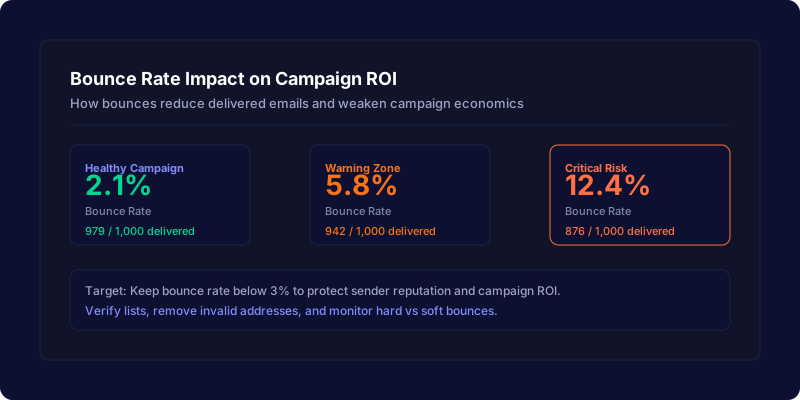
Short answer
An acceptable cold email bounce rate is below 3%. Between 3% and 5% is a warning zone. Above 5% means your list needs cleaning, your domains are at risk, and your campaign economics are weaker than your forecast assumes.
Every bounced email is one less opportunity for a reply. If you send 1,000 emails with a 5% bounce rate, only 950 are delivered. At a 4% reply rate, that costs you 2 replies compared to a healthy 2% bounce rate. Those lost replies cascade into fewer booked meetings, fewer clients, and lower revenue.
Bounce rate is a leading indicator of list quality. High bounce rates also trigger spam complaints, domain reputation damage, and potential sending restrictions from Google and Yahoo.
What is cold email bounce rate?
Bounce rate is the percentage of sent emails that are returned undelivered. It is calculated as:
Bounce rate formula
For example, if you send 2,000 emails and 80 bounce, your bounce rate is 4%. That means only 1,920 emails reached a real inbox.
Bounces are split into two categories:
- Hard bounces are permanent failures. The address does not exist, the domain is invalid, or the mailbox rejects the sender. These should be removed immediately.
- Soft bounces are temporary. The inbox is full, the server is down, or the message is too large. These may resolve on their own but should be monitored.
What bounce rate is acceptable?
| Bounce rate | Risk level | What it means | Action needed |
|---|---|---|---|
| 0% – 2% | Healthy | List is clean, domains are warmed, sending is stable | Continue monitoring |
| 2% – 3% | Acceptable | Minor list decay or occasional invalid addresses | Verify new contacts before adding |
| 3% – 5% | Warning | List quality is declining, domain reputation may be at risk | Clean the list, remove hard bounces, review data sources |
| 5%+ | Critical | High risk of spam filtering, domain blocks, and deliverability damage | Stop sending, clean the list, re-warm domains, switch data sources |
Google and Yahoo both recommend keeping bounce rates low. While they do not publish a hard threshold, industry best practice is to stay below 3% to protect sender reputation and avoid triggering automated spam filters.
How bounces reduce campaign ROI
Bounce rate directly reduces the number of delivered emails. Fewer delivered emails means fewer replies, fewer positive replies, fewer booked meetings, and less revenue. The math is simple but often overlooked in campaign planning.
| Scenario | Emails sent | Bounce rate | Delivered | Reply rate | Replies |
|---|---|---|---|---|---|
| Healthy (2% bounce) | 1,000 | 2% | 980 | 4% | 39 |
| Warning (5% bounce) | 1,000 | 5% | 950 | 4% | 38 |
| Critical (10% bounce) | 1,000 | 10% | 900 | 4% | 36 |
At scale, the difference compounds. A campaign sending 10,000 emails with a 10% bounce rate loses 1,000 delivered emails. At a 4% reply rate, that is 40 fewer replies. With a 30% positive reply rate and 40% booking rate, that costs roughly 5 fewer booked meetings. If each meeting is worth $3,000 in expected revenue, the bounce rate just cost $15,000 in pipeline.
Why bounce rate matters for sender reputation
Bounce rate is not just a volume problem. It is a reputation problem. When emails bounce repeatedly, mailbox providers like Google and Yahoo interpret it as a sign of poor list quality or spammy behavior. The consequences include:
- Lower inbox placement for future sends from the same domain
- Higher spam complaint rates from frustrated recipients
- Potential domain blocks or sending restrictions
- Damage to the domain warm-up progress built over weeks
This is why bounce rate should be tracked alongside reply rate, positive reply rate, and spam complaint rate. A campaign with strong reply rates but high bounce rates is a ticking time bomb for deliverability.
Hard bounces vs soft bounces
| Type | Cause | Permanent? | Action |
|---|---|---|---|
| Hard bounce | Invalid email, non-existent domain, rejected sender | Yes | Remove from list immediately |
| Soft bounce | Full inbox, server down, message too large, temporary block | No (may resolve) | Monitor; remove if it persists after 2–3 attempts |
Most cold email tools and ESPs will automatically flag hard bounces. Soft bounces may require manual review. The safest approach is to remove any address that bounces more than twice.
How to reduce cold email bounce rate
1. Verify your email list before sending
Use an email verification service to check every address before it enters your campaign. Verification catches invalid domains, typos, role-based addresses, and known spam traps. This single step typically reduces bounce rate by 50% or more.
2. Remove hard bounces immediately
Do not retry hard bounces. Remove them from your list and from any future campaigns. Continuing to send to invalid addresses wastes credits and damages sender reputation.
3. Use targeted, relevant data sources
Stale or scraped lists produce higher bounce rates. Invest in data sources that verify contacts regularly. If a lead source consistently produces bounce rates above 5%, switch providers.
4. Monitor bounce rate by domain and campaign
Track bounce rate per sending domain and per campaign. If one domain shows a spike, pause it and investigate. If one campaign has higher bounces, review the data source and targeting criteria.
5. Keep domain warm-up conservative
When warming a new domain, start with small volumes and gradually increase. Sending too much too soon increases bounce risk and triggers spam filters. A slow, steady ramp protects reputation.
6. Authenticate your domains
Set up SPF, DKIM, and DMARC records for every sending domain. Authentication tells mailbox providers that you are a legitimate sender, which reduces the chance that bounces trigger broader deliverability issues.
Bounce rate in your campaign forecast
When you use ColdMailCalculator to plan a campaign, the delivery rate field accounts for bounces and undelivered messages. A 95% delivery rate assumes a 5% bounce or block rate. If your actual bounce rate is higher than your forecast assumption, the entire funnel shrinks.
Always use a conservative delivery rate when forecasting. If your list is new or unverified, assume 90–93% delivery. For clean, verified lists, 96–98% is reasonable.
Forecast the impact of your delivery rate
Use ColdMailCalculator to see how delivery rate, reply rate, and booking rate change your campaign ROI before you send.
Use the ColdMailCalculatorSources and further reading
For current sender requirements and anti-spam guidance, review Google's email sender guidelines, Google's sender guidelines FAQ, and Yahoo's anti-spam policy terms.